6055
Players online

Shiva Metin2 Official News: Latest Events and Patchnotes

Neues Shop System Guide (german)

11 months ago

Unser neues Shop System ist nun veröffentlicht. In diesem Beitrag erklären wir euch die wichtigsten Funktionen unseres Shop Systems.


Das Öffnen eines Offlineshops ist ab Level 15 möglich. Einige Funktionen des Shops und der Shopsuche sind nur mit einem aktiven Premium Pass möglich.

Diese Funktionen werden in unserem Beitrag nochmal gesondert hervorgehoben.


1. Hier trägst du den Namen deines Shops ein.

2. Zeigt dir den Gesamtwert aller deiner Gegenstände im Shop an.

3. Dort findest du alle Ein- und Verkäufe. 

4. Hier kannst du die Dekoration für deinen Shop auswählen. (Premium Feature)

5. Das ist der Button zum Öffnen deines Shops.

6. Zeigt dir den Betrag an Yang an, welchen du bereits verdient hast.

7. Mit diesem Button kannst du dein Yang von deinem Shop Depot abheben.


1. Hier kannst du den Titel deines Laden ändern. (Premium Feature)
2. Hier kannst du im Nachhinein jederzeit noch die Dekoration deines Ladens ändern. (Premium Feature)
3. Mit diesem Button kannst du alle Gegenstände gleichzeitig aus deinem Shop entfernen. (Premium Feature)
4. Hiermit kannst du dich zu deinem eigenen Shop teleportieren.
5. Dort lässt sich dein eigener Laden schließen.
6. Dort findest du alle Ein- und Verkäufe.
7. Diese Slots lassen sich mit einer Erweiterung öffnen für weiteren Verkaufsplatz.
8. Dies ist die Zeit, welche dein Laden noch offen und erreichbar für potentielle Käufer ist.
9. Auf diesem Button lässt sich die Zeit deines Shops aufs Maximum auffüllen.
10. Mit diesem Button kannst du dein Yang von deinem Shop Depot abheben.
11. Rot hinterlegte Gegenstände sind bereits verkauft und lassen sich entfernen.
12. Gegenstände welche normal aussehen stehen zum Verkauf.


Preis Einstellungen

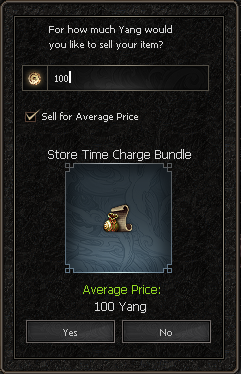
Einige Gegenstände verfügen ober einen sogenannten "Durchschnittspreis". Equipment und Gegenstände aus dem Itemshop so wie einige weitere sind davon allerdings ausgeschlossen. Gegenstände wie Upgrade Items verfügen über einen aktiven Durchschnittspreis. Dieser wird durch zufällig ausgewählte Verkäufe berechnet. Der Durchschnittspreis lässt sich nicht stark unter- oder überbieten um Pricetrolling vorzubeugen.


Ebenso lässt sich dein eigener Shop im Rufchat bzw. generell im Chat verlinken um deine Gegenstände aktiv zu bewerben.


Ebenso lassen sich einzelne Gegenstände aus deinem Offlineshop im Chat verlinken. (Premium Feature)


Globale Shopsuche


Die verschiedenen Kategorien stellen wir euch hier nicht vor. Wir bleiben in diesem Guide bei den wichtigen und grundlegenden Funktionen.

Unsere Shopsuche verfügt über eine unbegrenzte Anzahl an Seiten, welche durchgeschaut werden können.


1. Hier trägst du den Namen des Gegenstands oder des Spielers ein, was du suchen möchtest.

2. Ein Haken hier sorgt dafür das du genau dieses Item suchst. Dies ist nützlich wenn du z.B. nach Eiskugeln+ suchst damit keine Eiskugeln ohne + angezeigt werden in deiner Suche.

3. Ein Haken an dieser Stelle sorgt dafür das nur nach Spielernamen gesucht wird.

4. Hier lassen sich Suchen von dir abspeichern und darauf zugreifen.

5. Dieser Button setzt sofort alle deine Filter und Sucheinstellungen zurück.

6. Mit einem Klick auf die Lupe werden dir alle Gegenstände von diesem Spieler angezeigt.

7. Mit einem Klick auf dieses Symbol öffnet sich das Nachrichtenfenster mit diesem Spieler. Ebenso wird der Status des Spieler angezeigt. Grün = Online, Rot = Offline

8. Preise werden farblich gekennzeichnet um Betrug und Fehlkäufe vorzubeugen. Auf jedem Gegenstand wird auch der Einzelpreis angezeigt.

9. Du kannst mehrere Gegenstände markieren und gleichzeitig kaufen mit dieser Funktion. (Premium Feature)


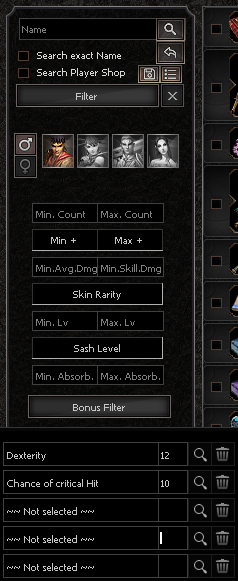
10. Hier findest du alle Filteroptionen. Mit dem Bonus Filter lassen sich auch spezielle Kombinationen von Equipment suchen. Siehe:


Gegenstände lassen sich nun auch im Upgrade Fenster so wie im Wiki mit der Tastenkombination "X + Linksklick" suchen.


Du wirst benachrichtigt wenn du etwas verkauft hast. Dies sieht wie folgt aus:


Solltest du jemals Aktivitäten in deinem Shop verpassen, so wirst du alternativ auch hier benachrichtigt.


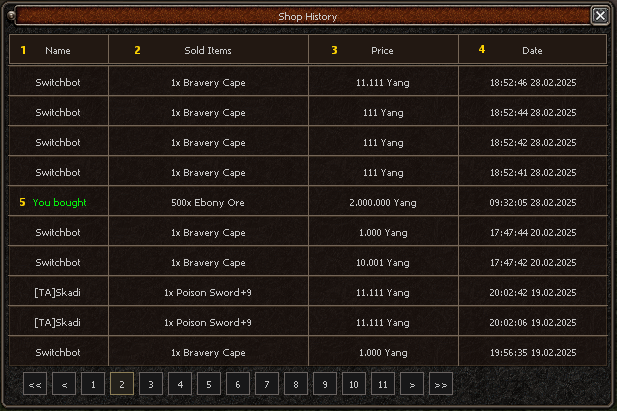
Zusätzlich lassen sich alle Aktivitäten auch im Nachhinein nochmal ganz genau kontrollieren durch unsere Verkaufslogs.
Ebenso deine eigenen Einkäufe lassen sich nochmals kontrollieren.


1. Name des Käufers

2. Gegenstände, welche verkauft wurden.

3. Zu welchem Preis diese verkauft wurden.

4. Das genaue Datum und Uhrzeit lässt sich einsehen.

5. Deine eigenen Käufe in anderen Shops sind noch mal speziell farblich gekennzeichnet.


Alle im Premium Pass enthaltenen Vorteile im Shop System im Überblick


1. Das Erstellen des Shops kostet nur die Hälfte.

2. Der Shop hat nach Erstellung die doppelte Startlaufzeit.

3. Du kannst dich zu deinem eigenen Shop teleportieren.

4. Du kannst jederzeit den Titel deines Shops ändern.

5. Du kannst die Dekorationen für den Shop nutzen.

6. Du kannst Gegenstände innerhalb deines Shops verschieben.

7. Du kannst alle Gegenstände auf einmal aus deinem Shop entfernen.

8. Du kannst Gegenstände aus deinem Shop im Chat verlinken.

9. Du kannst Items von überall aus kaufen.

10. Du kannst mehrere Items gleichzeitig in der Shopsuche kaufen.

11. Du zahlst keine Steuern mehr.

12. Zeitaufladungen für deinen Shop haben einen 100% Bonus.


New Shop System Guide (english)

11 months ago

Our new shop system is now live! In this post, we will explain the key features of our shop system.


Opening an offline shop is possible from level 15. Some features of the shop and shop search are only available with an active Premium Pass.

These features are specifically highlighted in our post.


1. Here, you enter the name of your shop.
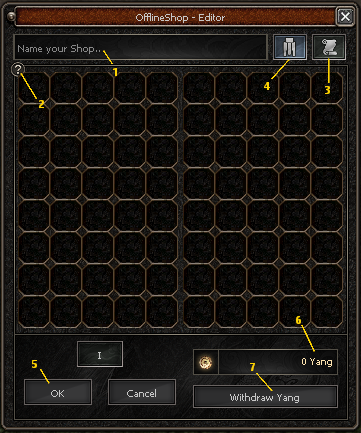
2. Displays the total value of all your items in the shop.

3. Here you can find all your purchases and sales.

4. This is where you can select the decoration for your shop. (Premium Feature)

5. This is the button to open your shop.

6. Displays the amount of Yang you have already earned.

7. Use this button to withdraw Yang from your shop deposit.
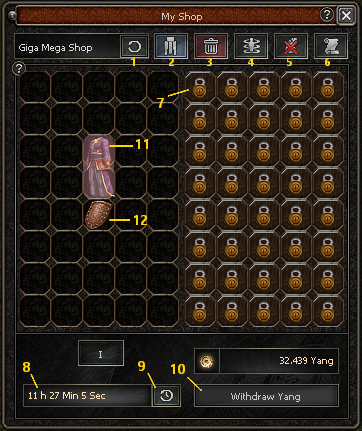


1. Here you can change the title of your shop. (Premium Feature)

2. Here you can modify your shop’s decoration at any time. (Premium Feature)
3. This button allows you to remove all items from your shop at once. (Premium Feature)
4. Use this to teleport to your own shop.
5. This option allows you to close your own shop.
6. Here you can find all your purchases and sales.
7. These slots can be unlocked with an expansion for additional selling space.
8. This indicates the remaining time your shop will stay open and accessible to potential buyers.
9. This button allows you to extend your shop's open time to the maximum.
10. Use this button to withdraw Yang from your shop deposit.
11. Items highlighted in red have already been sold and can be removed.
12. Items that appear normal are still available for sale.


Price Settings

Some items have a "average price." However, equipment, item shop goods, and certain other items are excluded from this. Items like upgrade materials have an active average price, which is calculated based on randomly selected sales. The average price cannot be significantly undercut or exceeded to prevent price trolling.


You can also link your own shop in the shout chat or general chat to actively promote your items.


You can also link individual items from your offline shop in the chat. (Premium Feature)


Global Shop Search


We will not introduce the different categories here. In this guide, we will focus on the important and basic functions.

Our shop search has an unlimited number of pages that can be browsed.
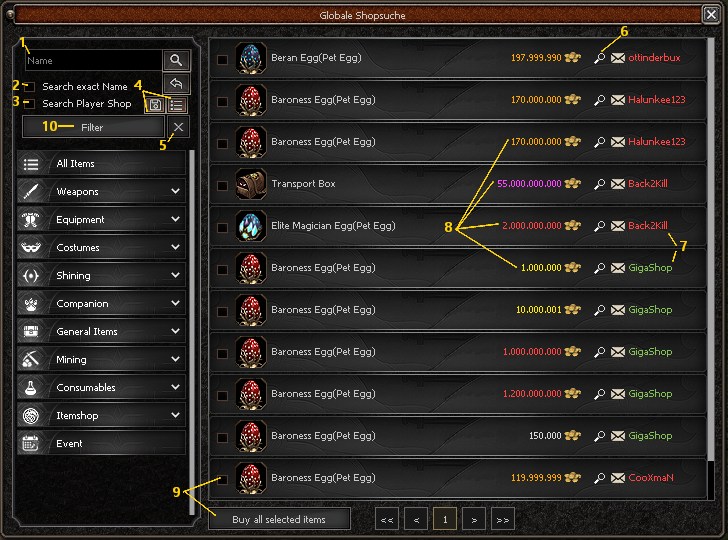

1. Here you enter the name of the item or player you want to search for.

2. A checkmark here ensures that you are searching for exactly this item. This is useful if, for example, you're searching for "Curse Book+" to avoid seeing Curse Book without the "+" in your search results.

3. A checkmark here ensures that the search is restricted to player names only.

4. Here you can save your searches and access them later.

5. This button resets all your filters and search settings immediately.

6. By clicking on the magnifying glass, you will see all items from this player.

7. Clicking this icon opens the messaging window with this player. It also shows the player's status: Green = Online, Red = Offline

8. Prices are color-coded to prevent fraud and prevent incorrect purchases. Each item also displays the individual price.

9. You can mark multiple items and purchase them simultaneously using this function. (Premium Feature)


10. Here you can find all the filter options. With the bonus filter, you can also search for specific combinations of equipment:


Items can now also be searched in the Upgrade window as well as in the Wiki using the key combination "X + Left Mouse button"


You will be notified when you have sold something. It will look like this:


If you ever miss activities in your shop, you will also be notified here alternatively.


Additionally, all activities can be reviewed in detail later through our sales logs. You can also review your own purchases.


1. Name of the buyer

2. Items that were sold

3. The price at which they were sold

4. The exact date and time can be viewed

5. Your own purchases in other shops are specially highlighted with a distinct color.


Here’s an overview of all the Premium Pass benefits in the Shop System:


    1. Creating the Shop costs only half.

    2. The shop has double the initial running time after creation.

    3. You can teleport to your own shop.

    4. You can change the title of your shop at any time.

    5. You can use decorations for your shop.

    6. You can move items within your shop.

    7. You can remove all items from your shop at once.

    8. You can link items from your shop in the chat.

    9. You can buy items from anywhere.

    10. You can buy multiple items at once in the shop search.

    11. You no longer pay taxes.

    12. Time recharges for your shop have a 100% bonus.

    Valentines Day Event 2025 [english]

    1 year ago

    Valentine's Day Event


    The event starts at 14.02.2025 around the day and ends on 23.02.2025 around the day.


    ______________________________________________________________________

    The following content will be available in the itemshop during the event period time:

    Rune of Valentina

    10% Strong against Monster

    10% Strong against Metins

    10% increased Itemdrop

    25% Chance for EXP Bonus

    Duration: 5 Days (time expires immediately)


     Mount Certificate (Valentine)

    8% Strong against Monster

    8% Strong against Metins

    8% Strong against Boss

    Duration: 5 Days (time expires immediately)


     Pet Certificate (Valentine)

    8% Strong against Monster

    8% Strong against Metins

    1000 HP

    Duration: 5 Days (time expires immediately)

    ______________________________________________________________________

    The following items can be dropped alternatively on all monsters:

     Valentina Stone

    ______________________________________________________________________

    The following items can be dropped on metins level 40 and above:

    Valentina Diamond


     Metins from level 40 have a drop chance of about 25%.

     Metins from level 75 have a drop chance of about 60%.

     Metins from level 95(Grotto) have a drop chance of about 85%.


    ______________________________________________________________________

    The following items can be dropped on bosses and dungeon bosses:


     Energy of Love


     Lower level open world bosses like Orc Chief - Ghost Tree Lord have a drop chance of about 20%.

     Mighty Ice Witch has a drop chance of about 45%.

     Wu-Kong has a drop chance of about 20%.

     Harisha has a drop chance of about 40%.

     All Elite bosses and mutated dungeon bosses have a drop chance of about 80%.

     All dungeons from level 75, except the demon tower, have a drop chance of about 75%.


    ______________________________________________________________________


    At the Event NPC Valentina you can craft with some event items the Medium of Love, which you need to buy costumes at the event trader.


    Otherwise, the following can be crafted at Valentina:


    Rune of Valentina

    5% Strong against Monster

    5% Strong against Metins

    10% increased Itemdrop

    25% Chance for EXP Bonus

    Duration: 5 Days

    ______________________________________________________________________

    Love Panther (Mount Skin)


    8% Strong against Monster

    Duration: 5 Days

    ______________________________________________________________________

    King Doggo(Pet Skin)


    8% Strong against Monster

    Duration: 5 Days

    ______________________________________________________________________

    Romance Collection

    The costumes are available in a 5-day version through the event and therefore have a special shining. If you want to use this collection after the event, you will have to go to the item store. However, the costumes are sold there without the additional shining.


    Attention: Drop chances and crafting recipes can be adjusted at any time if necessary.


    Lovely Valentine ♥

    Valentinstags-Event 2025 [german]

    1 year ago

    Valentine's Day Event


    Das Event startet am 14.02.2025 im Laufe des Tages und endet am 23.02.2024 im Laufe des Tages.


    ______________________________________________________________________

    Folgende Gegenstände können während des Eventzeitraums im Itemshop erworben werden.

    Rune der Valentina

    10% Stark gegen Monster

    10% Stark gegen Metins

    10% erhöhter Gegenstandsdrop

    25% Chance auf EXP Bonus

    Laufzeit: 5 Tage (läuft sofort ab)


     Mount Zertifikat (Valentinstag)

    8% Stark gegen Monster

    8% Stark gegen Metins

    8% Stark gegen Bosse

    Laufzeit: 5 Tage (läuft sofort ab)


     Pet Zertifikat (Valentinstag)

    8% Stark gegen Monster

    8% Stark gegen Metins

    1000 TP

    Laufzeit: 5 Tage (läuft sofort ab)

    ______________________________________________________________________

    Folgende Gegenstände können alternativ gedroppt werden bei allen Monstern:

     Valentina Stein

    ______________________________________________________________________

    Folgende Gegenstände können bei Metins ab Level 40 gedroppt werden:

    Valentina Diamant

     Metins ab Level 40 haben eine Dropchance von etwa 25%.

     Metins ab Level 75 haben eine Dropchance von etwa 60%.

     Metins ab Level 95(Grotte) haben eine Dropchance von etwa 85%.


    ______________________________________________________________________

    Folgende Gegenstände können bei Bossen und Dungeonbossen gedroppt werden:

     Energie der Liebe

     Niedrigere Open World Bosse wie Oberork - Geisterbaum-Lord haben eine Dropchance von etwa 20%.

     Große Eishexe hat eine Dropchance von etwa 45%.

     Wu-Kong hat eine Dropchance von etwa 20%.

     Harisha hat eine Dropchance von etwa 40%.

     Alle Elitebosse und Mutierte Bosse haben eine Dropchance von etwa 80%.

     Alle Dungeons ab Level 75, abgesehen vom Dämonenturm, haben eine Dropchance von etwa 75%.


    ______________________________________________________________________


    Bei dem NPC Valentina kann man mit den Eventgegenständen ein Medium der Liebe craften, welches man benötigt um Kostüme beim Event Händler zu kaufen.


    Ansonsten lässt sich bei Valentina noch folgendes craften:


    Rune der Valentina

    5% Stark gegen Monster

    5% Stark gegen Metins

    10% erhöhter Gegenstandsdrop

    25% Chance auf EXP Bonus

    Laufzeit: 5 Tage

    ______________________________________________________________________

    Liebespanther (Mount Skin)


    8% Stark gegen Monster

    Laufzeit: 5 Tage

    ______________________________________________________________________

    King Doggo (Pet Skin)


    8% Stark gegen Monster

    Laufzeit: 5 Tage

    ______________________________________________________________________

    Romanze Kollektion

    Die Kostüme sind in 5 Tage Version durch das Event erhältlich und haben dadurch ein besonderes Shining. Wer diese Kollektion nach dem Event noch benutzen möchte, muss auf dem Itemshop zurückgreifen. Dort werden die Kostüme allerdings ohne das zusätzliche Shining verkauft.


    Wichtiger Hinweis: Die Dropchancen und Craftingrezepte können jederzeit angepasst werden, wenn nötig.


    Lovely Valentine ♥


    Preview #5 - Offlineshop

    1 year ago


    Our rework of the Offline Shop and the Shop Search is entering its final phase. We are testing and optimizing many aspects on a daily basis. In addition to well-known and common features that most good servers already have, we have also come up with our own new innovations. Today, we want to show you one of them.